
Range time is a precious commodity. This is especially true for gun writers. It seems there are always more reviews to work on than there are hours available on the shooting range. I bought a set of Longshot Ranger+ target cameras in an effort to get more done. After using them for some time, it’s worth talking about what did and didn’t work well.
Reviews @ TFB:
- TFB Review: Holosun HS510C Red Dot Sight
- TFB 1,000 Round Review: PSA Sabre 15 (Duty Grade Or Don’t-y Grade?)
- TFB Review: Smith & Wesson 1854 Stealth Hunter .357 Magnum
Disclosures: This review requires no disclosures. I bought this product through retail channels, and I have no relationship with the company.
Hardware
The Ranger+ system has two components. First and foremost is the Ranger camera unit. It is self-contained, with an aimable camera, power supply, and transmitter unit all inside an orange and black plastic housing. The camera is fully functional on its own for closer-range use.
The other unit is a receiver. It looks almost identical to the camera box but has no camera installed. Instead, this is a repeater that extends the signal reach from the camera unit. This box sits by the shooter and relays the camera signal to the device that acts as the screen.
Both the camera and receiver unit charge through USB-C plugs on the underside of the unit. Longshot includes two USB-to-USB-C charging cables but no power adapter. Both units operate with a single on/off switch, also located on the underside. Each box has three plastic legs that snap out to act as simple tripods.
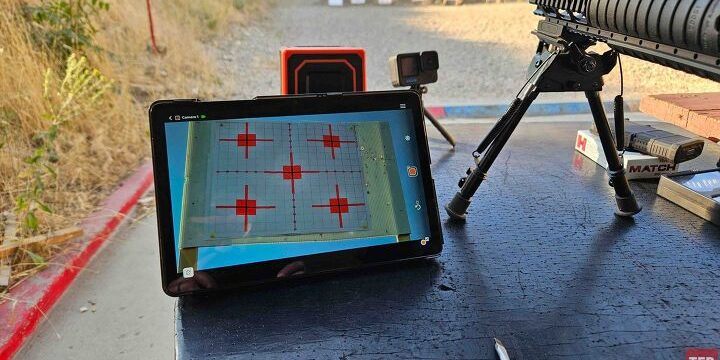
One final necessary component is a phone or tablet. There is no display built into the Ranger+; instead, it uses a Wi-Fi-enabled device to show the live target image. Most people have a spare device or two lying around that can pull this duty. I had planned to use an old phone, but after an unfortunate incident filming bullet impacts inside an engine bay (don’t worry, it was on a mount, not being held), I needed to find a new device to use that didn’t have a bullet fragment in it.


I then tried my regular cell phone, but had many issues getting it to work. After reading similar reports online about issues with devices that have data connectivity, I switched to the tablet that I use as a display for electronic targets when shooting CMP highpower competition. That solution worked much better and provided a much larger screen.
Software
Longshot provides an app for Apple and Android devices so they can be the screen unit for the camera system. They offer several videos showing how to use the app and connect to the cameras, which are well worth your time when learning the system. The app displays the camera view, showing impacts on the target in almost real time.
The app also offers a range of other functions. It has a setting to mark shots and measure group sizes. This requires marking a known-size reference item on the screen, then manually touching each bullet hole in the paper to build groups with measurements. There is also a dual recording feature. This uses the tablet camera to record the shooter while also recording the target. Influencers may find that useful in some situations, but it is a niche feature.
How It Works
My use case is similar to many other avid shooters. There is never enough range time to do all of the shooting projects I need to get done. One major place where time gets wasted is walking downrange to look at targets, measure groups, and post new targets. I bought the Ranger+ cameras hoping to streamline that process.
The first thing to learn is how to set up the units. Pro tip: Take your tablet downrange when setting up the camera. If you don’t, there is no way to see where the camera is pointed. My current practice is taking my tablet with the camera and setting it up with the tablet connected to the camera. Then I walk back to the line, power up the receiver unit, and connect to that.
That sounds like a decently quick process, but it is not. The process of getting the app to connect to the camera or receiver is slow and often doesn’t work. Eventually, it connects, but the annoyance of fiddling with the app and the Wi-Fi connection eats up some of the potential time savings the system appears to offer. And when you accidentally hit the back button one time too many and exit the app, you get to wait for the connection all over again, which can take several minutes.
Longshot includes a threaded mounting hole in the bottom of the camera. In a stroke of genius, I mounted the camera on an Arca plate so it could fit on my tripods. This provides a solid, adjustable way to put the camera right where I want it. On one of my regular ranges, I set the camera up about six feet off the ground but below the lip of the target pits. The camera is not visible at the firing line (and therefore cannot be hit), but the receiver is still able to make that connection.
Another word of caution: be sure the app is actually connected and responding if you are not seeing impacts on the paper. I was going crazy trying to figure out where a rifle that seemed like it was zeroed was hitting because nothing was showing up on the screen. I finally walked downrange and found numerous holes all over the target backer. Annoyed and discouraged, I walked back to the firing line and disconnected, then reconnected to the camera, and it started working again. There really should be a notification that pops up prominently to let you know that the connection is not active and that you are seeing the last transmitted target image rather than a live picture.

Battery life is very good. I have run the camera and receiver for six hours at a stretch, and the battery status lights still showed about half of the battery left. Your tablet will probably run out of battery and/or overheat before the Ranger+ runs out of power. The battery status lights also work well to give you a ballpark idea of how much power you have left on both the camera and receiver.
While the hardware works fine, there are flaws to discuss as well. There is no ability to focus, nor zoom in or out on the camera system. You have to get the image just right while you are down range by physically moving the camera and its lens housing.
Where the Longshot Ranger+ falls short is in the app. Even after the recent update, it is still clunky and annoying to use. The “flash” function is supposed to allow you to move between a prior picture and the current image, theoretically allowing you to see where a shot appears. In practice, it does not really work. You must remember to set the prior image, then set the current image to check between them. And depending on the lighting conditions, angle of the camera, and how the group falls on the paper, you still may not be able to see where that round went.
Another massive annoyance is the layout of the app buttons. If you miss the icon with your finger, you add another marked shot to your group. This is infuriating when you find out that Shot #9 of a 20-shot series was not actually a shot marked on the target, but was an inadvertent touch just off the edge of a button.
The dropped connections and frozen image were a constant annoyance, but also cost me some valuable content that would have been really valuable in my reviews. One instance that stands out was with the camera set up looking at a plate hidden back in some trees about 350 yards from my firing position. I filmed myself loading and shooting with one camera, and thought that the Longshot was recording downrange.
This would have made for a nice picture-in-picture segment showing my hits on that target along with video of me shooting, but the camera did not record it. It started raining and I ran out of time, and that was the end of that. It doesn’t take many failures like that to make you question the value proposition.
Conclusion
The Longshot Ranger+ is an intriguing, if flawed, product. If the whole system worked better, it would be an extraordinary product. The camera system itself works well enough. Where work is needed is the app. It is the weak link in the system.
If the app could do more, it would make a huge difference in the value proposition. The existing image flashing feature to find new bullet holes does not work well. But a change detection feature that compared earlier and later images to highlight the impacts as they happen would be incredible. I don’t know if that is feasible with the technology in the camera and app, but it would go a long way toward justifying the purchase price.

After several months of use and trying the Longshot Ranger+ in various range conditions, I do not know if it really saved me any time. When it worked, it was helpful, but there were so many glitches, disconnection issues, and times that the app froze and had to go through a lengthy restart process that it was probably a net loss to efficiency. I regularly found myself giving up on it and turning it off, and pulling my trusty old spotting scope out of the truck because I know it will show me the truth.
The recent software update fixed some things and is generally an improvement. Hopefully, those improvements continue, and more functions can be added. If Longshot can tune up the app to offer a more streamlined and user-friendly platform with functions that are easier to use, this would be an easy product to recommend. As it is, it may still be a worthwhile purchase if you want to see and notate your targets without walking downrange, particularly if you are looking at a target far enough away that a spotting scope can’t resolve the hits. You have to decide if that is worth the $450 price of admission.